
State Management using Provider and Hive in Flutter
This Blog is about how to use Hive in a Flutter app to persist data locally by building a simple shopping list.
Introduction
When learning Flutter, most of us start with setState.
It works well for small demos, but as soon as the app grows, managing state inside widgets becomes difficult.
In this blog, we’ll build a simple guest list app with setState and gradually improve it:
- Then replacing it with Provider.
- Finally persisting the state using Hive.
Managing state using setState
Let’s start with the simplest approach.
We take input from a TextField and add it to a list using setState.
class MyHomePage extends StatefulWidget {
  @override
  State<MyHomePage> createState() => _MyHomePageState();
}

class _MyHomePageState extends State<MyHomePage> {
  List<String> guestList = [];
  final TextEditingController _controller = TextEditingController();

  @override
  Widget build(BuildContext context) {
    return Scaffold(
      body: Column(
        children: [
          TextField(
            controller: _controller,
            onSubmitted: (value) {
              setState(() {
                guestList.add(value);
                _controller.clear();
              });
            },
          ),
          Expanded(
            child: ListView(
              children: guestList
                  .map((e) => ListTile(title: Text(e)))
                  .toList(),
            ),
          ),
        ],
      ),
    );
  }
}Managing state using Provider
Instead of keeping data inside the widget, we move it into a separate class.
1. Create a Provider
class GuestProvider extends ChangeNotifier {
  List<String> guestList = [];

  void addGuest(String name) {
    guestList.add(name);
    notifyListeners();
  }
}
This Class extends ChangeNotifier which provides the notifyListeners() method to notify all the listeners about the changes in the state. It holds the guest list and has a method to add a guest.
2. Provide the state to the widget tree
void main() {
  runApp(
    ChangeNotifierProvider<GuestProvider>(
      create: (_) => GuestProvider(),
      child: const MyApp(),
    ),
  );
}
Here, we wrap the main app with ChangeNotifierProvider to provide the GuestProvider state to the entire widget tree.
3. Access the state in widgets
TextField(
  onSubmitted: (value) {
    context.read<GuestProvider>().addGuest(value);
  },
)
In the TextField, we access the GuestProvider using context.read and call the addGuest method to add a new guest.
Expanded(
  child: ListView(
    children: context
        .watch<GuestProvider>()
        .guestList
        .map((e) => ListTile(title: Text(e)))
        .toList(),
  ),
)
In the ListView, we use context.watch to listen for changes in the GuestProvider and rebuild the list whenever a new guest is added.
Problem with provider alone
If you close the app and reopen it, the guest list is gone.
Why?
Because Provider keeps data in memory only.To persist data across app restarts, we need local storage.
1. Add Hive for local storage | Initialize Hive
Hive is a lightweight and fast key-value database written in pure Dart.
void main() async {
  WidgetsFlutterBinding.ensureInitialized();
  await Hive.initFlutter();

  runApp(const MyApp());
}
Here, we initialize Hive before running the app.So that we can use it for local storage.
2. Connect Hive with Provider | Update GuestProvider
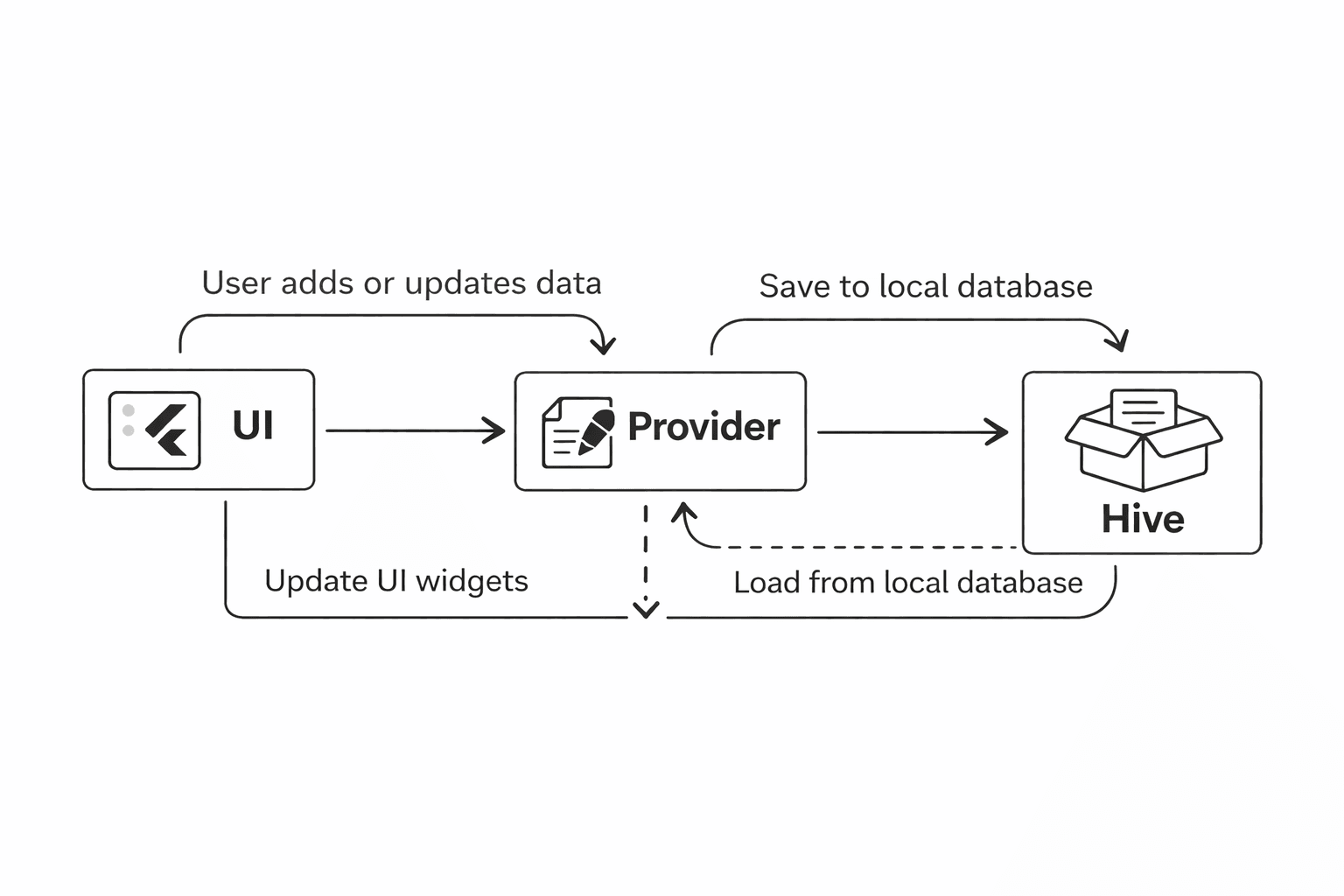
Instead of letting UI talk to Hive, Provider handles everything.
class GuestProvider extends ChangeNotifier {
  List<String> guestList = [];
  late Box box;

  GuestProvider() {
    _loadGuests();
  }

  Future<void> _loadGuests() async {
    box = await Hive.openBox('guestBox');
    guestList = List<String>.from(
      box.get('guest', defaultValue: []),
    );
    notifyListeners();
  }

  void addGuest(String name) {
    guestList.add(name);
    box.put('guest', guestList);
    notifyListeners();
  }
}- When the provider is created, it opens a Hive box and loads the guest list from local storage.
- When a new guest is added, it updates both the in-memory list and the Hive box to persist the data.
- This way, the guest list is saved locally and will be available even after app restarts.
- Each time data is added, notifyListeners() is called to update the UI.
The Data Flow
Recommended for you
Mar 10, 2026
Understanding Mobile App Notifications (Push, Local, and Background)
Notifications are everywhere in mobile apps, but they don’t all work the same way. Learn the three main types of notifications developers use and when to use each one.
Feb 21, 2026
How to Choose the Right Font for Mobile Apps.
There are thousands of fonts available today, but most successful mobile apps use sans-serif fonts. In this blog, I tested 5 popular sans-serif fonts on the same mobile UI to understand why and to decide which one works best for product design.